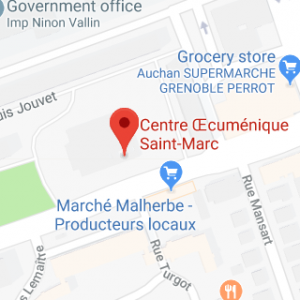
We meet in St Marc’s every Sunday at 10:45. Everyone is Welcome. We offer a Sunday school for children too !
We would love you to pray with us. See our Prayer pack page !
See our “What’s on” page for Important events. You can also follow our facebook page !
We are part of Saint-Marc’s ecumenical centre. (Centre oecuménique Saint-Marc)
See “Contact Us” for all church contacts, including our Safeguarding Officer.
Our Chaplain, John Gay, was licensed in Saint-Marc’s on Sunday 23rd March 2025. Welcome to him and his wife, Lucy ! and a big thank you to all the locums who were with us from September 2023 to March 2025.
You can join our services on zoom too. To get the link, please email contact@grenoblechurch.org.
You can read the sermons preached here !
—————————————————————
The English speaking church of Grenoble is a vibrant and exciting Bible focused church with members from all over the world. We are part of the Anglican diocese of Europe and affiliated to ICS.
We meet every Sunday in St Marc’s Ecumenical Centre (see map here) at 10H45 in the room called “Cana” and offer 2 classes of Sunday school for our children.
Some people join us for a couple of years and others just for a couple of weeks, some live in France permanently, but however long you are with us, you will soon find that you feel part of our growing church family.
We think of St. Marc’s as an oasis in the city, put here by God, for you.
Is anyone thirsty? Jesus said “Let them come to me and drink”.
Wherever you’re from, whatever your background, a warm welcome awaits you !